
Websites. We've all heard of them, visited them, and read their material, but what precisely are they? What causes them to exist? The quick answer is that they are documents that web browsers read and show on your screen, but the full answer is far more complicated. That's what we're here to help with.
Unique websites aren't created in the heat of the moment. They are first planned and then constructed (and frequently updated).
So, by giving you a solid plan, this guide will help you set yourself up for success with your website. If your team is working on it, you can provide it to an external developer or use it as an internal reference. Website preparation will improve everything, regardless of how you execute.
Your website success starts with strategy. Let’s talk about the topics below:
What Is A Website Blueprint?
A website blueprint is a one-of-a-kind, appropriately detailed plan that acts as an instruction manual for how your website should be developed to provide you and your company with the most outstanding online results.
It considers your company and its ideal customers, as well as the user experience and how it should be created and structured to give the most efficient conversion path and deliver you high-quality leads.
Classification Of Websites
The conceptualization phase of your website's development begins with you simply considering what type of website you want. This decision is based on your site's objectives and who your target audience is. Do you want to earn money on the internet? Maybe you'd like to share some of your treats? Whatever your purpose is, your website selection should reflect that. Only then will you be able to choose which platform is suitable for your needs and the specifics of what your website should include.
Here are some of the most basic types of websites and how to create them to give you an idea of what you can do:
- Online Store – used to sell products or services on the internet.
- Blogs - sites where you may publish information regularly on a particular topic.
- Online Portfolio’s - used to demonstrate your skills and knowledge.
It's good to remember that website types aren't exclusive. You may set up an online store with a blog as well. You may also establish a blog and sell items from there. One of the most appealing aspects of building your website is the freedom to choose what works best for you. Many different aspects may be combined to create a site that meets your needs.
You may make new ones or choose from a selection of website templates organized by category. There are thousands of professional-quality templates for any website topic available. This might help you get more precise ideas and help you figure out what components you should include in your website.
Article image — to be added
Recommended size: 800 × 400 px
Significance Of Website Planning
Too many people and businesses jump right into beating fingers without developing a strategy. I want to say that whether you're working on a project like constructing a website, a house, or launching a marketing campaign, you should take your time in planning and executing.
To "save time," too many people skip the planning stage. However, as they begin their project, they discover that if they do not take the time to plan for its execution, unexpected complications arise, forcing the builders to repeat some of their work.
When you take the time to think through your plan before starting the construction, you can usually anticipate some of these issues and develop a strategy to avoid them. This will save you time (and money) in the long run.
Tips To Have A Good Website
Here are some tips to keep in mind when creating a website blueprint when it comes to planning. If you make it a point to think about these tips, your chances of establishing a successful website will rise.
- Establish your website's objectives. What exactly are you working to achieve?
- Determine who your target audience is and what their interests are. How will you offer them the necessary information they require?
- What is your call to action going to be? Please determine what you want people to do when they visit your website.
- Determine how you'll get your readers to complete your call-to-action by enabling them to navigate your site easily.
- Make a list of keywords that you'll use throughout your site to help Google, Bing, and other search engines rank your pages higher.
There are more factors to make while building your website, but many are related to your own goals.
If you take the time to consider these factors, you will undoubtedly position yourself (or your company) for success. Let's take a closer look at each of these tips.
1. Establish Your Website’s Objectives

Basis of work on a given project, it's necessary to establish goals. You won't be able to figure out what you want to achieve if you don't set goals before developing a website.
You'll end up with a site with either too much information, too little information, or even the wrong information if you don't know what you want to achieve. Setting goals for your website will help you be more productive during the development process.
It will also enable you to return to the site after it has gone live and calculate your profit. How will you know if your website is successful if you don't set goals? Setting objectives does not require much time. Make sure you don't forget to complete this step. It's essential.
2. Selecting Your Website's Target Audience
For whom are you creating your website? What do they like to do when it comes to examining information? Do they enjoy reading articles? Would they want to watch videos instead? What is their preferred method of receiving content? Using fresh content, perhaps? Do you want to communicate by email? These are the kinds of audience-related questions you should be asking before deciding on the shape of your website.
It's important to know your target audience to customize your website to their preferences. When they're looking for information on your subject, your website will be at the top of their list of locations. It will keep your target audience coming back to your site and encourage them to tell their friends about it.
3. Creating A Call-To-Action For Your Website
The most effective websites include a prominent call-to-action on each page. How can you expect your audience to do what you want them to do if you don't inspire them to take action? You can't expect to achieve your objectives without a call to action.
If one of your website's objectives is to get an e-book into visitors' hands, one of your calls to action should be "download our e-book." If increasing website traffic is one of your objectives, "share this page with a friend" might be another call to action.
If you don't engage, your site visitors will have no idea what you want them to accomplish. Ensure one or more calls to action on each of your website's pages. A clear call to action will assist you in achieving your website's objectives.
4. The Importance Of Navigation On A Website
Too many sites contain content without considering how it will be navigated. You often put on a web page and have no idea how to get to the information you're looking for. What is it about Apple products that so many people adore? It's since they are intuitive.
When users look at an Apple product for the first time, they can quickly figure out how to use it. If you think about your navigation before you build your website, you'll find that your viewers will find their way to the pages you want them to see. Returning to the e-book example, if your call-to-action is "download our e-book," be sure to make it extremely clear where visitors can discover the e-book and download it.
Make sure there aren't too many different paths that all lead to the same page. People may be confused by this. A top left or right navigation bar is equally suitable for your page-based. You can then create interlinks between pages within your site's content. Use the material inside that blog post to link to your "services" page if you want people to go from your blog to your "services" page.
It's good to use the keywords from your keyword list when picking the terms to connect to your "service" page.
5. Draw Up A List Of Keywords For Your Website.
The importance of SEO in getting high-quality website visitors cannot be overstated. I suggest quality website traffic because it doesn't matter if you have 10,000 monthly visitors if none of them responds to your call to action. You're building a website to achieve specified objectives.Only by attracting the right sort of traffic will you be able to achieve your objectives (i.e., your target audience). Developing a keyword list to drive high-quality visitors to your website is necessary. There are several helpful tools available to assist you in determining which keywords to employ.
One of the better tools available is Google Keyword Tool. You can type in terms or phrases representing your site's content or concept. You may look for and input the URLs of other comparable websites. Google will then provide you with a list of the most relevant keywords and the number of sites that use them.
It's necessary to choose keywords that make the most sense for your website and audience and terms that aren't being utilized exclusively by several of your competitors. You will put your website up for success in attracting quality website traffic by carefully selecting the proper keywords.
Let's have a look at how your website plan is progressing.
Defining The Content Sections Of Our Website
Having broad content ideas for the initial steps in making a website is helpful, but if we want a more precise blueprint to work with, we'll need to identify our site's content areas precisely. A content area might be anything from a single content page to an entire category of content pages with similar material.
1. Make a list of the pages that your website cannot function without. Websites are, as we all know, a collection of pages. To start forming a more concrete picture of your site's structure, we'll need to make a list of the pages that will make up its structural framework.
We can start sorting out the pages our website needs using the content ideas from the workflow we discussed previously. Because most websites have a similar basic form, you should think about the following content areas:
- Home - This will be your website's home page. A solid homepage serves as a platform for all of your site's many content categories, and it should only contain the essential information your users are looking for.
- About - Your website will be your online face, regardless of the type of business you operate. As a result, it's essential to provide at least one page with information about your business.
- Products/Services - Whether or not you plan to market things directly through your website, it is crucial to inform your visitors of what your company has to offer. At the very least, provide a page that describes your products or services.
- Contact - Maintaining online credibility is complex, and a website lacking at least some contact information will be viewed as unreliable. A contact page will reassure your customers and make it easier for them to contact you.
It's necessary to keep in mind that categorizing our content ideas into topic groups is not a random process. The purpose of your site must be reflected in your content areas.
If you're creating a website for a business card, it's only logical that you'll include a significant "about" section. If you're starting an online store, , your "product/service" should feature prominently.
2. Additional content is being developed. While these pages provide a reasonable basis for our website, they are insufficient to ensure that it fulfills its peak performance.
To attract even more people to our site, we may try to develop more content categories based on the data we acquired during our keyword research. Take note of the types that your competitor's website has.
Your competitors' pages and categories will almost always contain keywords that they are targeting. Creating separate content categories for articles and materials with specific keywords serves two purposes:
- Please increase the number of visitors to your site by attracting them through search engine results.
- Engage your users by giving them the extra information your site can provide and meeting their demands.
Not only does listing our content topics help us maintain our site's organized as it grows, but it also gives us a blueprint for planning out our content ahead of time.
Article image — to be added
Recommended size: 800 × 400 px
Layout Your Website

Take some time to consider what pages your website would require. Keep in mind the idea of "one page, one goal," and ensure that each of your pages is focused on one specific goal.
Objective tools include:
• Images, graphics, a calendar of events, a scheduler, a payment gateway, and so on.
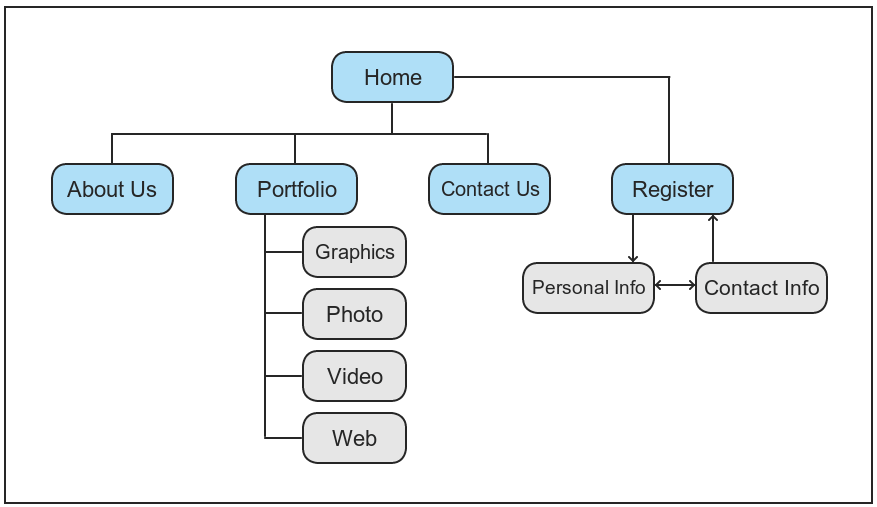
• Create a concept map of your site's structure. Even if it's a simple website, picturing how the pages interact and flow will help you make better decisions. You want your website's visitors to go through.
The site map planner on the following page might help you plan your website.
Web Site Planner

Your Website’s Insights: What To Communicate
Your website is an extension of your brand and perhaps the essential marketing tool you have.
The following questions should assess what you want to say to your viewers:
1. What exactly do you want your website to accomplish?
It's essential to understand why and what a website must do.
2. What website graphic design appeals to your examples?
Make a list of websites that you particularly enjoy and explain why.
3. Do you have any websites relevant to your sector that you dislike?
Please make a list of the common trends you despise and make a list of them.
4. Colors.
In your branding, what colors do you use? What more colors would you like to use?
5. There are some visual requirements.
Make a list of any unique requirements for your situation. (I.e., mobile device compatibility, handicap accessibility (508 compliance), technology, and integration.) Customer relationship management, the ability to change material oneself, and so on.
Promotion And Marketing

You must attract visitors to the site once it has been released. This is where site promotion comes in, and it includes many things such as search engine optimization (SEO), social media marketing, targeted advertising, and so on.
Collaborate with your marketing team to develop new ways to market and promote your website. A mind map may support the organization of your thoughts and the development of an effective marketing strategy.
Article image — to be added
Recommended size: 800 × 400 px
Take A Ways To Consider!
Pros
- Get straight to the point. Visitors are more likely to browse than reading pages. A solid rule of thumb is to cut the number of words on a page in half.
- Keep the content from being too scant, though, as this may harm search results.
- Words can be browsed by headlines, subheads, bold, or italics.
- Use testimonials liberally on your website.
- Create a simple navigation system.
- Make the most of your website as a marketing tool—take down email addresses. Provide a "free item" that your prospects will appreciate.
Cons
- Treat your website pages as if they were pages from a literature review.
- If you want to attract an elegant, fine-dining customer, write an inexpensive copy that appeals to a McDonald's customer (it's just an example).
- Make use of images found on the web. (Copyright could lead to a fine.)
- Don't use colors or styles that contradict your brand name.
- Make it difficult for people to get a hold of you.
- Include a variety of tricks.
- Overload your website with social network feeds, useless symbols, flashing text, moving graphics, and other distracting features.
We hope that this blueprint will provide you with all you need to get ready for your website project's success. When everything goes as planned by you, your website will establish trust, educate, and shorten your sales cycle if it is well-designed and well-executed.
We've developed and polished our operation over time, resulting in new solutions and improved functionality. You can that this process will be simple, straightforward, and, most importantly, pleasant. We want you to become interested, develop new ideas, and engage.
Make a list of everything. Bring your vision to reality.